
You may already have a MasterCard in your wallet or purse. Millions of Americans do. It’s one of the most widely used cards in America and Canada. If you have a MasterCard, then you can start to use it with Casino right away. Simply use it the same way you would with any other online payment.
I have a MasterCard, how do I update my card details?
Step 1. Visit Casino.com
Step 2. Log in using your username and password.
Step 3. Click the Buy Now Button and select the package that you would like to buy.
Step 4. Select the Credit Cards option under Payment Methods.

Step 5. Enter the details of your MasterCard card.
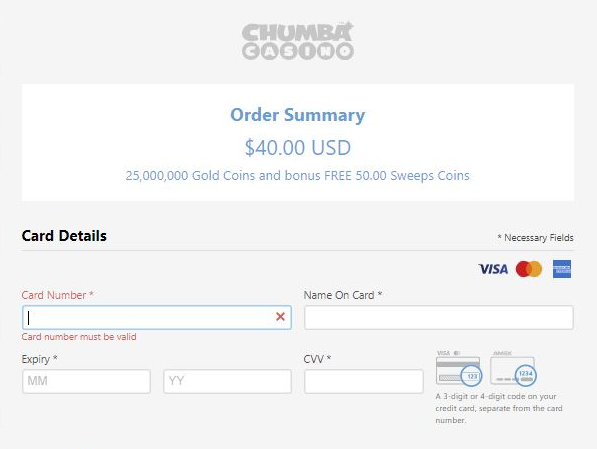
Step 6. Click the Pay button.

Step 7. Head back to the lobby and get ready to enjoy your favorite game!
I don’t have a MasterCard. Where do I get one?
The easiest MasterCard to get is a MasterCard Debit Card. It’s not a Credit Card, so there are no late fees to juggle. It’s a straightforward system where you pre-load your balance onto the card, then use it just like a regular debit card.
There are lots of options to choose from for a reloadable MasterCard, but the Casino team has done some research on which are the fastest and easiest to get and also have favorable fee structures.
None of the options below require a credit check. Go ahead and CLICK!


MasterCard Debit Card From Your Bank
Most banks have options to issue either MasterCard or Visa debit cards.
If you currently have a Visa debit card, you can often request an additional debit card from your bank that is a MasterCard. Many banks will allow you to do this and keep your existing Visa debit card active.
Contact the bank where you have a checking account directly to make this request for a new MasterCard debit card.
Other MasterCard Debit Card Options
Want to know where to get more MasterCard Debit Cards & get a card today? Click Here to find out.
I'm having problems purchasing with MasterCard.
If you are experiencing difficulty purchasing Gold Coins using a MasterCard, our expert team is waiting to help guide you via Live Chat or you may reach us by sending us a message here.
Comments
0 comments
Article is closed for comments.